
PC Tools Registry Mechanic11.1 - Download
You'll be able to download in few seconds.
Publisher Description
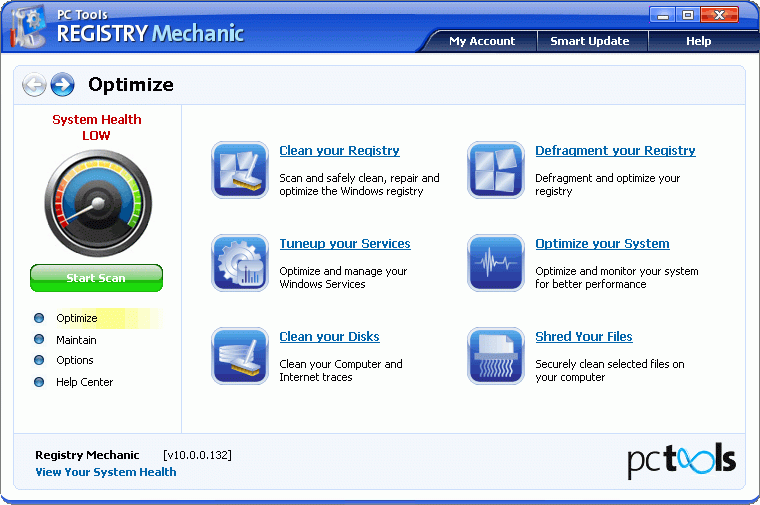
Registry Mechanic is an advanced registry cleaner for Windows that can safely clean and repair problems with your registry in a few simple mouse clicks! Easily fix problems with the Windows registry that are a common cause of crashes and errors. By using a registry cleaner regularly and fixing your registry your system should not only be more stable but it will also help Windows and your software run faster. Registry Mechanic uses a high-performance detection algorithm to quickly identify missing and invalid references in your Windows registry. These problems can occur for many reasons including being left-behind after the un-installation or incorrect removal of software, by missing or corrupt hardware drivers, or orphaned startup programs. With a few easy steps Registry Mechanic will scan your entire registry for any invalid entries and provides a list of the registry errors found, you can then choose to selectively clean each item or automatically repair them all. For your convenience and protection Registry Mechanic can also make a backup of any repairs made so that you can easily recover any changes if required.
About PC Tools Registry Mechanic
This Registry Tools program is available in English, Danish, Dutch, Finnish, French, German, Italian, Japanese, Korean, Norwegian, Polish, Portuguese, Russian, Spanish, Swedish. It was last updated on 29 September, 2026. PC Tools Registry Mechanic is compatible with the following operating systems: Windows.
The company that develops PC Tools Registry Mechanic is PC Tools. The latest version released by its developer is 11.1.
The download we have available for PC Tools Registry Mechanic has a file size of 17.8 MB. Just click the green Download button above to start the downloading process. The program is listed on our website since 2012-07-24 and was downloaded 0 times. We have already checked if the download link is safe, however for your own protection we recommend that you scan the downloaded software with your antivirus. Your antivirus may detect the PC Tools Registry Mechanic as malware if the download link is broken.
How to install PC Tools Registry Mechanic on your Windows device:
- Click on the Download button on our website. This will start the download from the website of the developer.
- Once the PC Tools Registry Mechanic is downloaded click on it to start the setup process (assuming you are on a desktop computer).
- When the installation is finished you should be able to see and run the program.
Program Details
General
System requirements
Download information
Pricing
Version History
version 11.1
posted on 2012-07-24
1. New System Monitor Functionality - all the functions from the Desktop Maestro Optimize Your Computer' have been transferred to this build of Registry Mechanic.
2. Enhanced Scanning Problem Detection Engine. This should lead to a cleaner more stable Registry.
version 5.2
posted on 2006-04-11
Registry Mechanic 5.2 now includes a new tool called Registry Monitor. The monitor tool will setup checkpoints in every location registered for RM custom scanning. Any kind of activity within these locations will register a change and notify the monitor tool.
Disclaimer
External Download
We do not host PC Tools Registry Mechanic on our servers. We did not scan it for viruses, adware, spyware or other type of malware. This app is hosted by the software publisher and passed their terms and conditions to be listed there. We recommend caution when installing it.
The external download link for PC Tools Registry Mechanic is provided to you by apps112.com without any warranties, representations or guarantees of any kind, so access it at your own risk.
If you have questions regarding this particular app contact the publisher directly. For questions about the functionalities of apps112.com contact us.
